¶ Resizing a partition without rebooting
Make sure to backup the system before making any changes
¶ Backing up the partition table
sfdisk -d /dev/sda > partition_bak.dmp
Make sure to backup your partition table before making any changes.
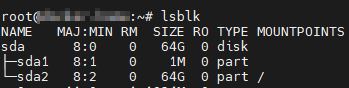
¶ List disks and show block size
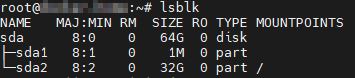
Use lsblk to list the available disks and its partitions.
¶ Grow the partition
Grow the partition using growpart
growpart /dev/sda 2

growpartis part of cloud-utils. In case you don't have it, you can install with:sudo apt-get install cloud-utils
¶ Grow the filesystem
Grow the filesystem using resize2fs
resize2fs /dev/sda2

Now the partition should be resized. You can check if it worked using lsblk again.